How to Check If a Hi-Res File Is Actually Hi-Res
You paid for the 24-bit 96 kHz download. Your AVR or software player agrees: it says 24/96 right there in the file info. But that line only describes the container, not the music inside it. A CD-quality master run through a resampler produces a file that reports 24/96 just as confidently as a real hi-res transfer does, and it will play back without a single clue that anything is wrong.
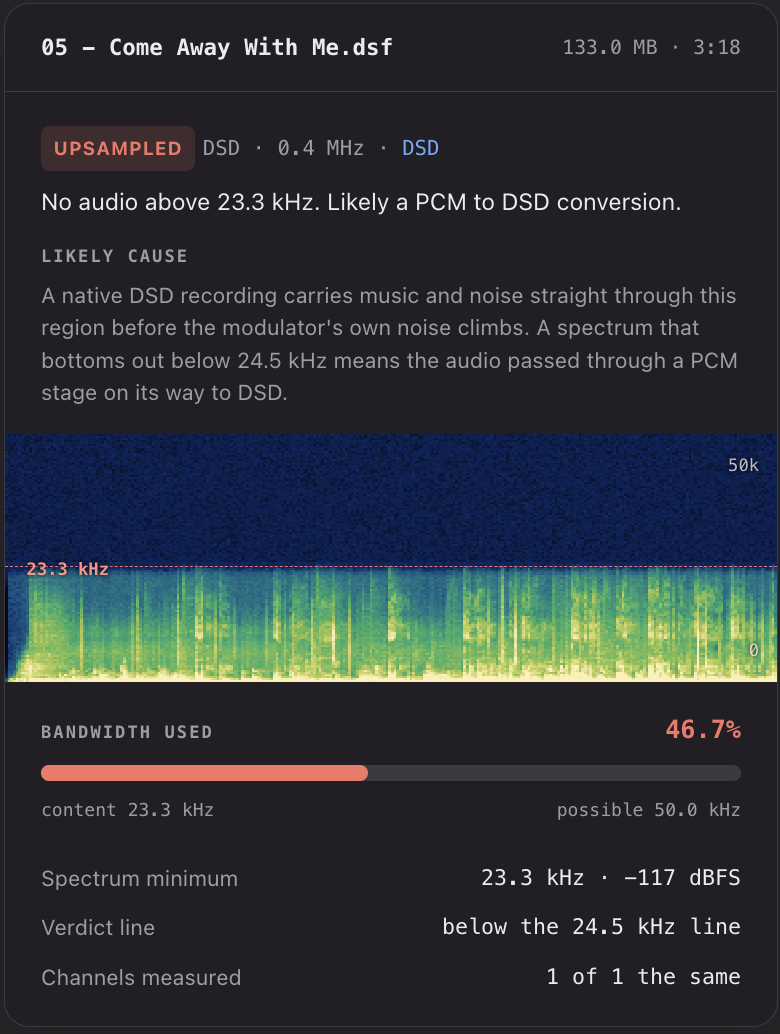
This is the other half of the question I wrote about in how to verify your extraction is actually lossless. That post answers “did the audio come off the disc intact.” This one answers a different question, and for me a more annoying one: “was the thing on the disc ever hi-res in the first place?” I’ve been burned by a few discs in my collection. Blue Note Records’ Come Away with Me SACD by Norah Jones is just a CD upsampled. A perfect, bit-exact, checksum-matching extraction of an upsampled master is still an upsampled master.
I decided to build that detection into LExt. But then I realized everyone should be able to check. So I built a page that answers it in about ten seconds: losslessextract.com/verify-hires. Drop a file on it. Nothing is uploaded, nothing is stored, and the analysis runs the same multi-stage detection engine that ships soon inside Lossless Extract.
Why the Old Spectrogram Advice Was Only Half an Answer
The classic advice, the one I gave in Method 3 of the verification post, is to open the file in a spectrogram viewer and look at where the music stops. It is good advice. It is also where most people give up, because the picture is genuinely hard to read:
A hard line at 22 kHz looks damning, until it isn’t. Plenty of real recordings are quiet up there. Plenty of genuine hi-res transfers of old analogue tape have almost nothing above 20 kHz, because the tape didn’t either.
A picture with content up top looks clean, until it isn’t. Some upsampled masters have noise added above the cliff, either as a byproduct of the export or deliberately, and to the eye that noise fills the gap perfectly well.
And you have to do it one file at a time, squinting at a coloured smear and making a judgement call you are not really equipped to make.
What actually separates the two cases is not whether the top of the band is empty. It is how the music ends. That is a measurement, not a vibe, which means a computer can do it consistently and you don’t have to.
What the Detection Engine Measures
The engine measures the audio itself. It runs a high-resolution spectrum analysis (an FFT, which just means breaking the sound into its individual frequencies) across the whole file, and looks at where the music ends and how it ends.
A genuine hi-res recording fades. It slides gradually down into its own recorded noise floor: tape hiss, room air, the mic preamp, whatever the recording chain contributed. That noise is real, it was captured, and it keeps going to the top of the band.
An upsampled file falls off a cliff. A resampler has a filter, and that filter cuts hard at the old format’s ceiling, 22 kHz for a CD source. Above the cut there is nothing, because nothing real ever existed up there. The cliff also never moves. Real music breathes: a cymbal crash pushes the band edge up, a quiet passage lets it fall. A filter’s cut sits at exactly the same frequency for the entire album.
On top of that basic test, the engine runs several more, because the shortcuts people take to hide a cliff each leave their own signature:
Silent holes in the spectrum. Nothing physical leaves a gap. A quiet band with content on both sides of it means something was layered on top of an upsampled source.
Synthetic dither. Some 24-bit exports stamp noise-shaped dither over the whole top of the band, which papers over the cliff nicely. The tell is that this noise rises toward the top. Real recorded noise never rises. You can tell when an upsampled 48 kHz to 96 kHz file is worked on in a DAW and then exported, because that dither is now where it shouldn’t be.
Whether the stuff above the cliff is real. If there is content up there, the engine checks whether it behaves like signal or like manufactured filler.
24-bit files carrying 16 bits of audio. In genuine 24-bit audio, roughly one sample in 256 lands exactly on the 16-bit grid. When nearly every sample lands on it, the bottom byte is padding, not music.
DSD gets its own test. A native DSD recording carries music and noise straight through the 18 to 45 kHz region before the modulator’s own noise starts climbing. A file that dips to a minimum below 24.5 kHz went through a PCM stage on its way to DSD.
Every threshold in there was calibrated against my own extensive library of discs I already knew the answer for, genuine on one side and upsampled on the other. That calibration is the part that took the time. Writing an FFT is a weekend. Knowing which numbers actually convict is a lot of discs.
What Actually Runs in Your Browser
The page is plain JavaScript with no frameworks, and every part of it runs on your own machine.
Decoding is FFmpeg, compiled to WebAssembly so it can run on a web page. It is a custom stripped-down build that contains only the audio decoders we need (FLAC, WAV, MKA and DSF, including DSD), which is why it is a 1.3 MB download instead of the usual 32 MB.
The detection math is a line-for-line port of the Swift analysis engine inside Lossless Extract. It is not a simplified web version and it is not tuned separately. It doesn’t give false positives like a few of the other checkers I tried. Every time the code changes, an automated gate re-runs both the app and the web page over a library of test files and discs and refuses to publish unless they agree to within a tenth of a decibel. The page and the app give the same answer because they are the same maths.
The work is spread across Web Workers, so the analysis uses several CPU cores at once and the page stays responsive while it runs.
How to Read What It Tells You
UPSAMPLED means the measurement contradicts the label. The file is stored at a high rate, but the audio inside carries the fingerprint of a lower-rate source. The card tells you which test fired and what the likely cause is, and names the source rate only when the measured ceiling lands within 0.6 kHz of a standard rate. If it can’t name it, it says so rather than guessing.
NOT FLAGGED is not the same as proven genuine. It means nothing in the file contradicts its label. That is the best I can do. No measurement can prove a master came off the original tape at 96 kHz. It can only fail to catch it lying.
Some files can’t be judged, and it says so. Bandwidth verdicts need 88.2 kHz or better, because a 44.1 or 48 kHz file that stops at its own ceiling is the format working correctly, not a fake. The bit-depth test needs a 24-bit file.
You also get the spectrogram, so you can see the thing the verdict is describing, and a Save Card button that writes the whole result out as an image if you want to send it to a label, a forum thread, or the seller.
Quick Reference
| Question | Where to look |
|---|---|
| Did my extraction come off the disc intact? | Checksums and AccurateRip, covered in the verification post |
| Is this 24/96 file really 24/96? | The hi-res checker, FLAC, WAV, MKA or DSF |
| Is this DSD file native DSD? | The same checker, drop the DSF |
| Is this 24-bit file really 24-bit? | The same checker, it runs the bit-depth test automatically |
| Is the master any good? | Neither. That is a mastering question, and no amount of resolution fixes it |
| Whole discs: SACD ISO, DVD-Audio, Blu-ray | Coming to Lossless Extract itself, which will badge upsampled content during analysis |
FAQ
Is my file uploaded anywhere?
No. The audio file is processed locally. The decoding and the analysis both run in your browser.
Which files can I check?
FLAC, WAV, MKA, M4A and DSF, including DSD. Whole discs, an SACD ISO or a DVD-Audio or Blu-ray folder, are currently Lossless Extract only.
My file came back NOT FLAGGED. Is it definitely real hi-res?
It means nothing in the audio contradicts the label, which is the strongest thing any measurement can honestly say. A genuine transfer of a 1970s analogue master may have very little content up high, and that is fine: the engine is looking at how the band ends, not how far up it reaches.
It flagged a file I bought from a reputable store. Now what?
It happens more than you would like, and usually the store is not the problem. Upsampled masters get delivered to stores by labels, and the store passes on what it was given. Save the card and send it to them. Most of the hi-res download catalogue was assembled from whatever tape or file transfer was on hand at the time.
Does hi-res even matter if the mastering is bad?
No. A well-mastered CD beats a badly mastered 24/96 file every time. I wrote about that in why mastering matters more than format, and the streaming versus disc masters post covers why the same album can sound different on every service. The checker answers one narrow question: does the file contain what it claims to contain. That question is still worth answering before you pay a premium for it.
Try it on a file you already own: losslessextract.com/verify-hires