libaacs & keydb.cfg: How to Set Up Blu-ray Decryption for Lossless Extract
Setting up libaacs and dowloading the FindVUK database keydb.cfg is required before you can extract audio from encrypted Blu-ray discs. If you’ve just hit the aacs setup dialog after dragging a Blu-ray disc into Lossless Extract, or you can’t work out where your keydb.cfg file should go, then keep reading. Whether your on Windows or Mac this guide walks you through complete setup, so you can get straight to extracting TrueHD Atmos , DTS-HD MA, and PCM audio with Lossless Extract.
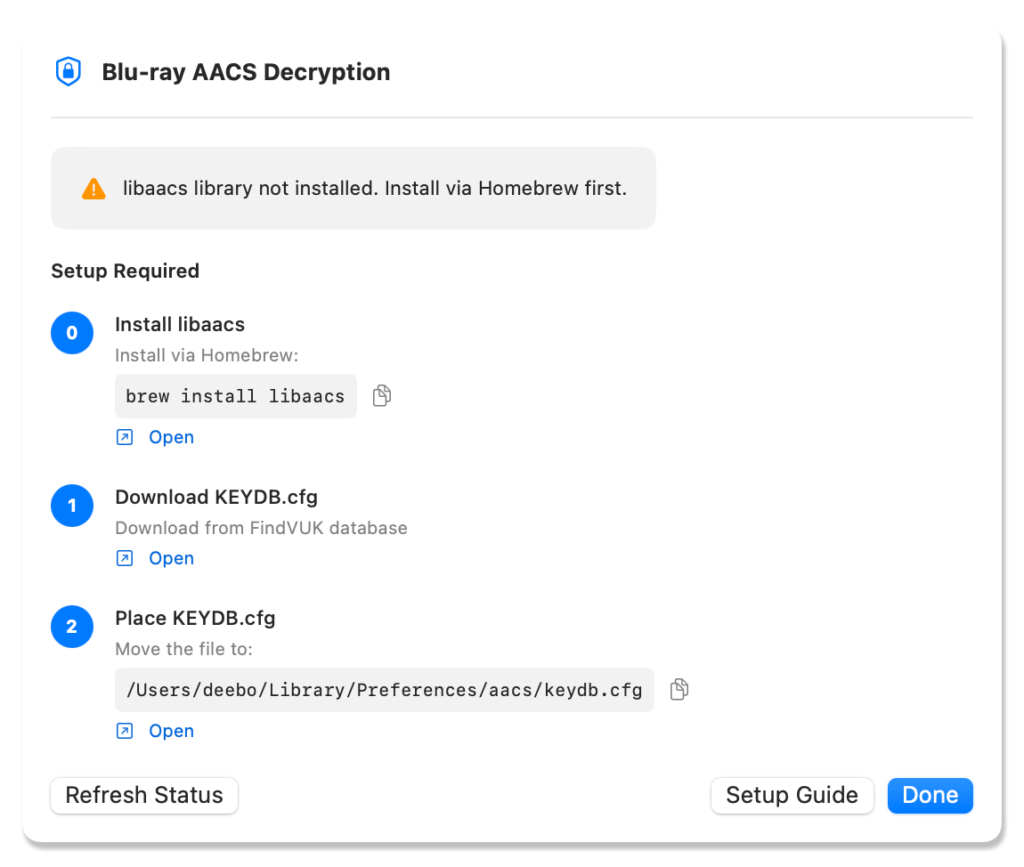
What libaacs and the FindVUK Online database keydb.cfg Actually Do
Blu-ray discs use AACS (Advanced Access Content System) encryption. Before any software can read the audio or video data on a disc, it needs the decryption keys for that specific disc.
- libaacs is the open-source library that handles AACS decryption. Lossless Extract and players like VLC rely on it to read encrypted discs.
- FindVUK Online database is a website that updates keys as new discs are released to allow these discs to be decrypted. Once a disc’s key is in your keydb.cfg, any libaacs-powered app can open that disc
What You Need
- A Blu-ray drive connected to your Mac or Windows PC
- Lossless Extract
- The correct keydb.cfg file location for your OS (covered below)
Step 1 — Install libaacs
macOS
In order to install libaacs on macOS you will first need to install Homebrew. Then install libaacs by copy and pasting the command below into the terminal:
brew install libaacsLossless Extract will automatically detect libaacs.
Windows
On Windows, libaacs needs to be present as a DLL file that players and extraction tools can find.
- Download the latest libaacs Windows build from https://github.com/KnugiHK/libaacs-libbdplus-windows/releases
- You’ll receive a .zip containing
libaacs.dll - Place libaacs.dll in: C:\Program Files\Lossless Extract\libs\ffmpeg\x64\
- Restart Lossless Extract after placing the DLL
Note: If you see a “libaacs.dll not found” or “AACS library missing” error, the DLL is either missing or in the wrong location. Double-check the path.
Step 2 — Download and Set Up Your keydb.cfg File
First download the keydb.cfg from FindVUK Online Database. The keydb.cfg is a plain-text file that stores the decryption keys for your Blu-ray discs. libaacs reads this file every time it opens a disc.
Where to Put keydb.cfg
The file must go in a specific location depending on your OS:
macOS:
~/Library/Preferences/aacs/keydb.cfg
To get there: in Finder, press Cmd+Shift+G and paste the path:
~/Library/Preferences/aacs/ Create the aacs folder if it doesn’t exist, then place keydb.cfg inside it.
Windows:
%APPDATA%\aacs\keydb.cfg
%APPDATA%\aacs\Create the aacs folder if it doesn’t exist, then place keydb.cfg inside it.
Downloading keydb.cfg vs. Using an Existing File
If you already have a keydb.cfg
Troubleshooting Common Errors
Still getting the AACS setup dialog
- Open the
keydb.cfg - Confirm your
keydb.cfg - Confirm
libaacs.dll
“libaacs.dll not found” on Windows
- Re-download and place it in the correct directory.
- The DLL is missing or in the wrong folder
Frequently Asked Questions
Yes — the file format is identical. Copy it between machines freely. Just place it at the correct OS-specific path on each machine.
Lossless Extract bundles everything it needs. You don’t need to install libaacs separately unless you specifically want to extract audio from encrypted Blu-ray. Decrypted Blu-ray still extracts via bdmv folder, mkv or iso
Using your own Blu-ray discs with libaacs and FindVUK database keys for personal archiving falls under fair use in most jurisdictions. This guide is intended for users archiving discs they own. Always check the laws in your region.